Interface elements
Interface elements
Interface elements represents an interaction between points, edges or surfaces. They are used to model debonding between surfaces or more general fracture processes through the use of cohesive zone (cz) models. They can also be used to model contact between elements. Specific interface material models needs to be used - consult the matlibmanual for supported models.
Ordering convention:
All inerface elements have plus-side and a minus-side and all nodes should first be specified for the minus-side and then the plus-side. The normal to the interface is defined to point from the minus-side to the-plus side. Direction of normal vector on an element specifies normal stress/cohesion across the element. It is assumed that normal jump, normal traction are at the first position of corresponding vectors. Stiffness matrix in local coordinates has always on position 1,1 normal stiffness and then shear stiffness.
IntElPoint, Interface1d elements
Implementation of one dimensional (slip) interface element. This element connects two separate nodes and the interaction is governed by a one-dimensional slip law. This law determines the force acting between the nodes as a function on their relative displacement in the slip direction. The element can be used in 1D, 2D, and 3D (default) and its features are summarized in Table 38.
Keyword |
IntElPoint, Interface1d (deprecated) |
Description |
One dimensional (slip) interface element |
Specific parameters |
[ |
Parameters |
|
Unknowns |
One, two, or three DOFs (u-displacement, v-displacement, w-displacement) are required in each node, according to element mode (determined from domain type). |
Approximation |
|
Integration |
|
Features |
|
CS properties |
|
Loads |
|
Nlgeo |
0 |
Status |
Reliable |
Note |
Element requires material model with _1dInterface support. |
Tests/Examples |
sm/InterfaceEL_Point2D_01.in, sm/interface01.in, sm/InterfaceEL_Point3D_01.in, sm/InterfaceEL_Point3D_02.in, sm/InterfaceEL_Point3D_03.in, sm/bondceb02.in |
Bondlink3dtruss element
This class implements a bond link for connecting trusses and continuum elements for meshes in which the nodes of the trusses and continuum elements coincide. The bond area for this element is calculated from the length and diameter of the truss element that is bonded to the continuum as \(A_{\mathrm{bond}} = \pi d l\), where \(A_{\mathrm{bond}}\) is the bond area, \(d\) is the reinforcement diameter and \(l\) is the length of the element. The input parameters for this element are shown in Table 39.
Keyword |
bondlink3dtruss |
Description |
3d bond link element for trusses |
Specific parameters |
|
Parameters |
|
Unknowns |
Three dofs (\(u\)-displacement, \(v\)-displacement, \(w\)-displacement) are required in each node. |
Note |
Element is used together with the |
Tests/Examples |
Bondlink2dtruss element
This class implements the 2D counterpart of bondlink3dtruss: a bond link connecting a truss
node (first node) and a continuum node (second node) at the same position, typically a hanging node
inside the continuum element. The displacement jump between the two nodes is expressed in a local
system with the first axis along dirvector (slip) and the second axis perpendicular to it in
the x-y plane (lateral). The interface material is evaluated with a zero out-of-plane component, so the
same materials as for bondlink3dtruss can be used, e.g. linkslip with the bond-slip
law for the slip and the lateral stiffness kl for the lateral jump. The bond area is
calculated as \(A_{\mathrm{bond}} = \pi d l\). The input parameters for this element are shown in
Table 40.
Keyword |
bondlink2dtruss |
Description |
2d bond link element for trusses |
Specific parameters |
|
Parameters |
|
Unknowns |
Two dofs (\(u\)-displacement, \(v\)-displacement) are required in each node. |
Note |
Element is used together with the |
Tests/Examples |
IntElLine1, Interface2dlin elements
Implementation of a two dimensional line element with a linear approximation of the displacement jump. The element can be used to tie together two element edges and is defined by four nodes - two on each edge. Note that, the nodes along the interface are doubled, each couple with identical coordinates. Nodes on the negative side are numbered first, followed by nodes on the positive part. Requires material model with _2dInterface support. The element features are summarized in Table 41.
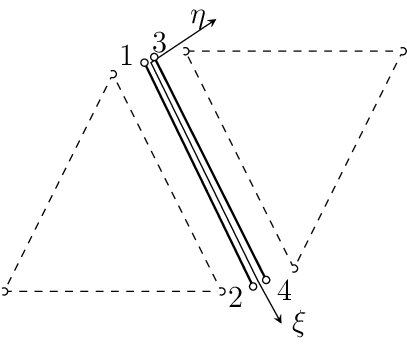
Fig. 18 Interface2dlin element with linear interpolation. Definition and node numbering convention
Keyword |
IntElLine1, Interface2dlin(deprecated) |
Description |
2D interface element with linear approximation |
Specific parameters |
[ |
Parameters |
|
Unknowns |
Two dofs (u-displacement, v-displacement) are required in each node. |
Approximation |
Linear approximation of displacements and geometry. |
Integration |
Full integration of all strain components using two point integration formula. |
Features |
|
CS properties |
|
Loads |
|
Nlgeo |
0 |
Status |
Reliable |
Note |
Element requires material model with _2dInterface support. |
Tests/Examples |
IntElLine2, Interface2dquad elements
Implementation of a two dimensional interface element with quadratic approximation of displacement field. Can be used to glue together two elements with quadratic displacement approximation along the shared edge. Note, that the nodes along the interface are doubled, each couple with identical coordinates. Nodes on the negative side are numbered first, followed by nodes on the positive part. Requires material model with _2dInterface support. The element features are summarized in Table Table 42.
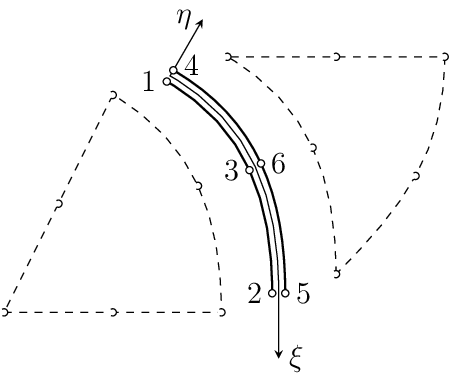
Fig. 19 Interface2dquad element with quadratic interpolation. Definition and node numbering convention
Keyword |
IntElLine2, Interface2dquad (deprecated) |
Description |
2D interface element with quadratic approximation |
Specific parameters |
[ |
Parameters |
|
Unknowns |
Two dofs (u-displacement, v-displacement) are required in each node. |
Approximation |
Quadratic approximation of displacements and geometry. |
Integration |
Full integration of all strain components using four point integration formula. |
Features |
|
CS properties |
|
Loads |
|
Nlgeo |
0 |
Status |
Reliable |
Note |
Element requires material model with _2dInterface support. |
IntElSurfTr1, Interface3dtrlin elements
Implementation of a three dimensional interface element with linear approximation of displacement field. Can be used to glue together two elements with linear displacement approximation along the shared triangular surface. Note, that the nodes along the interface are doubled, each couple with identical coordinates. Nodes on the negative surface are numbered first, followed by nodes on the positive part. The numbering of surface nodes on positive surface (+) determines the positive normal (right hand rule). Requires material model with _3dInterface support. The element features are summarized in Table 43.
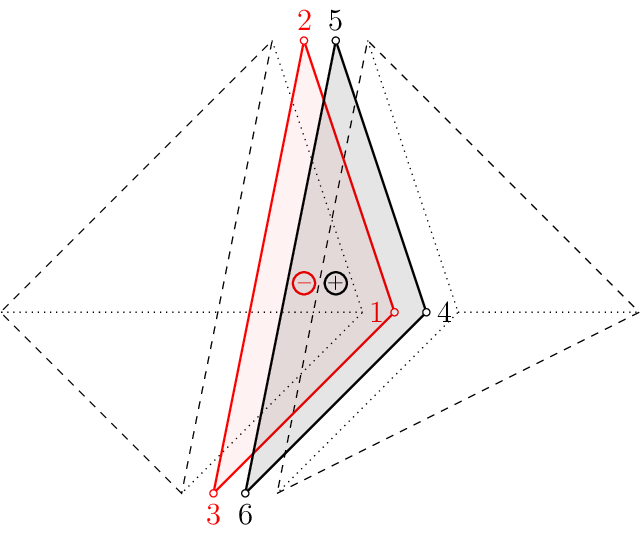
Fig. 20 Interface3dtrlin element with linear interpolation. Definition and node numbering convention
Keyword |
IntElSurfTr1, Interface3dtrlin (deprecated) |
Description |
3D interface element with linear approximation |
Parameters |
|
Unknowns |
Three dofs (u-displacement, v-displacement, w-displacement) are required in each node. |
Approximation |
Linear approximation of displacements and geometry. |
Integration |
Full integration of all components using one point integration formula. |
Features |
|
CS properties |
|
Loads |
|
Nlgeo |
0 |
Status |
Reliable |
Note |
Element requires material model with _3dInterface support. |
Tests/Examples |
sm/InterfaceEL_SurfTr1.in (and 1 more) |
IntElSurfQuad1 element
Implementation of a three dimensional interface element with linear approximation of displacement field. Can be used to glue together two elements with linear displacement approximation along the shared quad surface. Note, that the nodes along the interface are doubled, each couple with identical coordinates. Nodes on the negative surface are numbered first, followed by nodes on the positive part. The numbering of surface nodes on positive surface (+) determines the positive normal (right hand rule). Requires material model with _3dInterface support. The element features are summarized in Table Table 44.
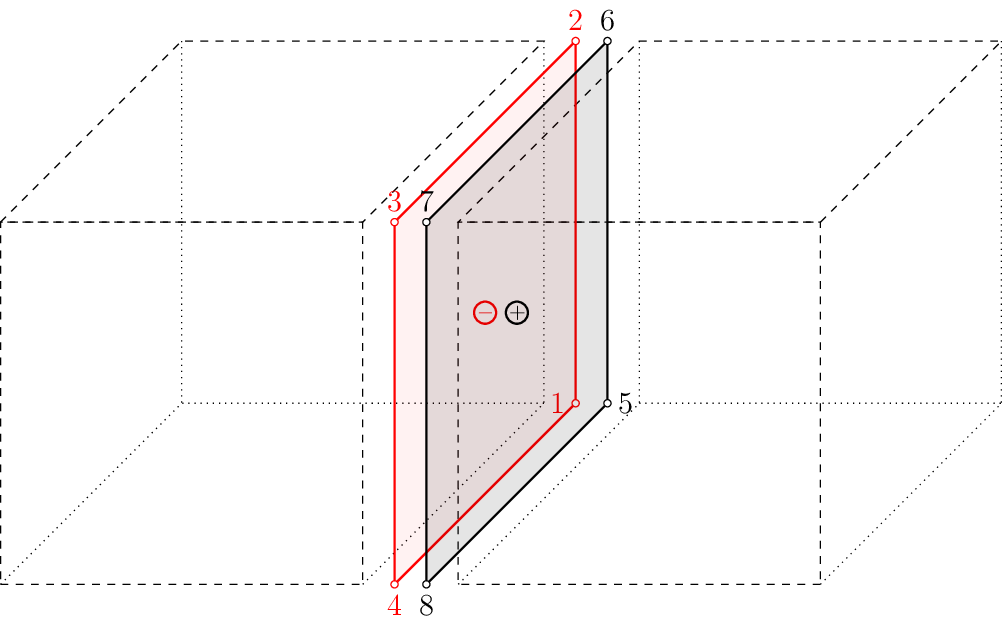
Fig. 21 IntElSurfQuad1 element with linear interpolation. Definition and node numbering convention
Keyword |
IntElSurfQuad1 |
Description |
3D interface element with linear approximation |
Parameters |
|
Unknowns |
Three dofs (u-displacement, v-displacement, w-displacement) are required in each node. |
Approximation |
Linear approximation of displacements and geometry. |
Integration |
Full integration of all components using one point integration formula. |
Features |
|
CS properties |
|
Loads |
|
Nlgeo |
0 |
Status |
Reliable |
Note |
Element requires material model with _3dInterface support. |
Tests/Examples |
Bondlink3d element
This class implements a bond link for connecting beam (frame) and continuum elements in unstructured meshes. The node ordering is important: the first node carries the rigid arm and must therefore have rotational degrees of freedom, while the slip (displacement jump) is evaluated at the second node. For continuum (matrix) element nodes that have no rotational degrees of freedom, the reinforcement (beam/rebar) node must be given first and the continuum node second. The slip is then evaluated at the matrix. The main idea is to use the rotation of the beam element and the rigid arm from the beam node to the continuum element node to compute the displacement jump at the matrix node (and two components, which are perpendicular to each other and lie in a plane for which the direction along the rebar is normal to. This element differs from the other interface elements since the first stiffness component is in the direction of the slip. The bond area for this element is calculated from the length and diameter of the truss element that is bonded to the continuum as \(A_{\mathrm{bond}} = \pi d l\), where \(A_{\mathrm{bond}}\) is the bond area, \(d\) is the reinforcement diameter and \(l\) is the length of the element. Each node has six degrees of freedom. The input parameters for this element are shown in Table 45.
Keyword |
bondlink3d |
Description |
3d bond link element for beams |
Specific parameters |
|
Parameters |
|
Unknowns |
Six dofs (\(u\)-displacement, \(v\)-displacement, \(w\)-displacement, \(u\)-rotation, \(v\)-rotation and \(w\)-rotation) are required in the beam node and three dofs (\(u\)-displacement, \(v\)-displacement, \(w\)-displacement) in the continnum node. The order of input of nodes must be beam node first and continuum node second. |
Reference |
|
Tests/Examples |
sm/bond_link_3.in, sm/bond_link_2.in, sm/linkslip01.in, sm/bond_link_1.in |