Postprocessing
By default, oofem produces output in the form of a readable text file, called the output file. At the same time, oofem can produce output in other formats that are more suitable for postprocessing in third-party tools. This is done by configuring one or more export modules in the input file. In this short tutorial, we will cover VTK postprocessing.
Configuring vtk export
VTK is a widely used format for storing simulation results. VTK files can be
opened in many visualization tools. The export of results in VTK format can be
done using the vtkxml export module.
The number of export modules is declared in the analysis record using the
nmodules keyword, and the export module records must immediately follow the
analysis record. The detailed syntax of the vtkxml record is described in
the oofem input manual.
As an example, consider the 3-point bending test input file (located in
tests/regression/benchmark/sm/concrete_3point.in),
which we modify to add the vtk export. The original file already declares one
module (errorcheck, which makes it a regression test), so nmodules
grows from 1 to 2 and the new record is inserted next to it:
concrete_3point.out
Test: 3-point bending, triangular elements, 1 loaded point
StaticStructural nsteps 20 solverType "calm" stepLength 0.025 rtolf 1e-4 Psi 0.0 MaxIter 200 reqIterations 80 HPC 2 1 2 stiffmode 1 nmodules 2
vtkxml tstep_all domain_all primvars 1 1 vars 2 1 4
errorcheck
domain 2dPlaneStress
...
The export has been requested for all solution steps (tstep_all) and all
domains (domain_all).
The primary variables exported consist of the displacement vector:
primvars 1 1, where primvars is the keyword for primary variable
export; what follows is an array of primary variable IDs (defined in
src/core/unknowntype.h),
the first number being the array size.
The export of secondary (internal) variables consists here of the stress and
strain tensors (vars 2 1 4, where the internal variable codes are defined
in
src/core/internalstatetype.h;
1 is IST_StressTensor and 4 is IST_StrainTensor).
Two further keywords are often useful: cellvars, which exports quantities
per element rather than smoothed to the nodes, and ipvars, which exports
the raw integration point values with no smoothing at all. Note that the
selectors are those of an export module, not of the OutputManager: the
dofman_all and element_all keywords are not accepted here, and
regionsets is what restricts the export to part of the model.
After running the modified, extended input, the solver will produce one vtu
file per solution step, named after the output file with the module number and
the step number appended:
concrete_3point.out.m0.1.vtu
concrete_3point.out.m0.2.vtu
concrete_3point.out.m0.3.vtu
...
Postprocessing in paraview
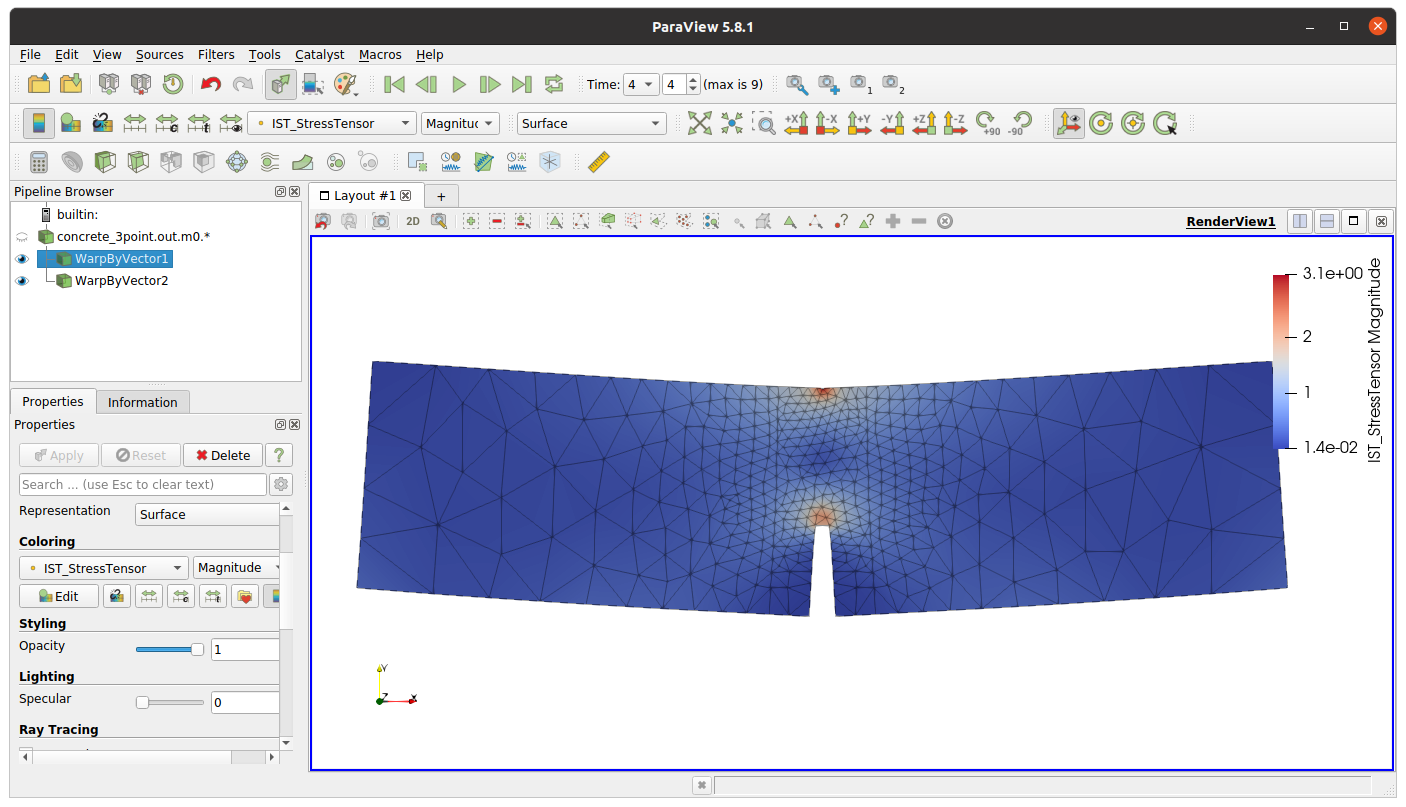
In this example, we will use Paraview (an open-source, multi-platform data analysis and visualization application, www.paraview.org). After installation of this tool, simply launch paraview and open one or all of the vtu files produced. Paraview recognizes the trailing numbers as a series, so opening the group lets you step through the solution in time.
Other export modules
vtkxml is the most commonly used export module, but it is not the only one.
The modules below are all configured the same way — a record following the
analysis record and counted in nmodules — and several of them can be active
at the same time:
vtkhdf5VTK data in a single HDF5 file instead of one file per step, which is preferable for analyses with many steps.
gnuplotLoad-displacement diagrams and similar curves, ready to plot.
homHomogenized (volume-averaged) quantities over the model or over selected sets, one row per step.
gpexportmoduleRaw integration point values, for custom processing.
matlabResults as a Matlab script.
poiValues interpolated at user-defined points of interest.
dmSelected dof manager (nodal) values.
outputThe standard text output file, exposed as a module so that its selectors can be configured like any other module’s.
errorcheckCompares results against reference values embedded in the input file. This is the mechanism behind the regression test suite (see Installation) and it is also a practical way to guard your own models against unintended changes.
The full list, with the parameters of each module, is in the oofem input manual.