Understanding input file
The OOFEM input file fully describes the problem under consideration. The input file is a text file with a specific structure, outlined below and fully documented in the OOFEM Input manual.
The input file can be prepared manually in any text editor, or generated by a special purpose code, preprocessor or converter.
The input file consists of several sections:
The ordering of the sections is compulsory
Each section can consist of one or more records (corresponding to lines)
Each record starts with a keyword followed by compulsory or optional parameters
The input file can contain comments (lines beginning with the
#character)Long input records (lines) can be split using the continuation character
\at the end of each lineThe content is not case sensitive
The sections follow in this order:
Output file record — the path of the text output file
Job description record — free text describing the problem
Analysis record — the problem type and its parameters
Export module records — as many as announced by
nmodulesDomain record — the domain type
Output manager record — what the text output should contain
Components size record — how many components of each kind follow
Domain component records, in this order: dof managers (nodes), elements, contact surfaces, cross sections, materials, nonlocal barriers, boundary conditions (loads included), initial conditions, functions, sets, and finally the optional XFEM and fracture managers
Sets are also accepted immediately after the element records, which is where older input files put them; both placements are supported.
Because the counts are declared up front in the components size record, OOFEM reads exactly as many records of each kind as announced. A mismatch between the declared count and the number of records is one of the most common input errors, and it typically surfaces as a complaint about an unexpected keyword somewhere further down the file.
Note
OOFEM silently ignores input fields it does not recognize, so a misspelled
parameter is simply not applied. Running with the -Werror option turns
the resulting warnings into errors and is strongly recommended while
developing a new model.
An Example
Consider the linear elastic analysis of the beam structure illustrated below.
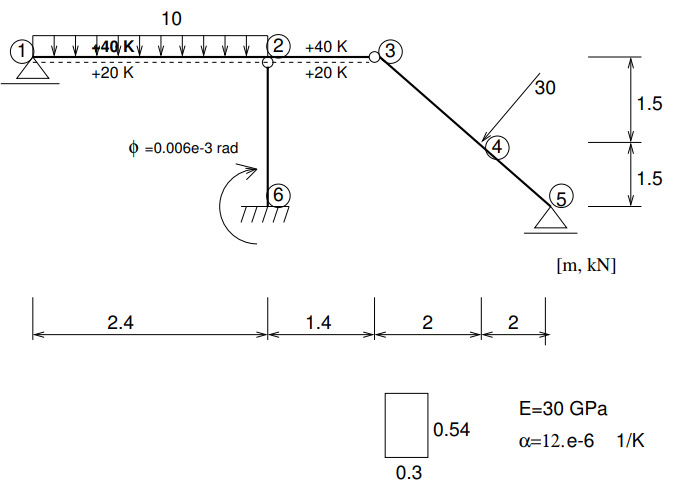
The full listing of beam2d_1.in is the following:
beam2d_1.out
Simple Beam Structure - linear analysis
#only momentum influence to the displacements is taken into account
#beamShearCoeff is artificially enlarged.
StaticStructural nsteps 3 nmodules 0
domain 2dBeam
OutputManager tstep_all dofman_all element_all
ndofman 6 nelem 5 ncrosssect 1 nmat 1 nbc 6 nic 0 nltf 3 nset 7
node 1 coords 3 0.  0.  0.
node 2 coords 3 2.4 0.  0.
node 3 coords 3 3.8 0.  0.
node 4 coords 3 5.8 0.  1.5
node 5 coords 3 7.8 0.  3.0
node 6 coords 3 2.4 0.  3.0
Beam2d 1 nodes 2 1 2
Beam2d 2 nodes 2 2 3 DofsToCondense 1 6
Beam2d 3 nodes 2 3 4 DofsToCondense 1 3
Beam2d 4 nodes 2 4 5
Beam2d 5 nodes 2 6 2 DofsToCondense 1 6
SimpleCS 1 area 1.e8 Iy 0.0039366 beamShearCoeff 1.e18 thick 0.54 material 1 set 1
IsoLE 1 d 1. E 30.e6 n 0.2 tAlpha 1.2e-5
BoundaryCondition 1 loadTimeFunction 1 dofs 1 3 values 1 0.0 set 4
BoundaryCondition 2 loadTimeFunction 1 dofs 1 5 values 1 0.0 set 5
BoundaryCondition 3 loadTimeFunction 2 dofs 3 1 3 5 values 3 0.0 0.0 -0.006e-3 set 6
ConstantEdgeLoad 4 loadTimeFunction 1 Components 3 0.0 10.0 0.0 loadType 3 set 3
NodalLoad 5 loadTimeFunction 1 dofs 3 1 3 5 Components 3 -18.0 24.0 0.0 set 2
StructTemperatureLoad 6 loadTimeFunction 3 Components 2 30.0 -20.0 set 7
PeakFunction 1 t 1.0 f(t) 1.
PeakFunction 2 t 2.0 f(t) 1.
PeakFunction 3 t 3.0 f(t) 1.
Set 1 elementranges {(1 5)}
Set 2 nodes 1 4
Set 3 elementedges 2 1 1
Set 4 nodes 2 1 5
Set 5 nodes 1 3
Set 6 nodes 1 6
Set 7 elements 2 1 2
The details explained
The input file starts with the output file record, represented by a line
containing the path to the output file
beam2d_1.out
The path is interpreted relative to the current working directory of the solver, not to the location of the input file.
Next, the job description record follows, represented by a line of free
text describing the problem. OOFEM does not interpret it in any way; it simply
copies it into the header of the output file.
Simple Beam Structure - linear analysis
The next record, called the analysis record, determines the problem to be
solved. In our case we solve a linear elastic problem represented by the
StaticStructural keyword. The analysis keyword has the compulsory parameter
nsteps, determining in this case the number of time steps representing load
cases in our example. The optional nmodules parameter announces how many
export module records follow immediately after the analysis record.
StaticStructural nsteps 3 nmodules 0
Next, the domain type is described. In the present version the domain type is
no longer relevant, but it is maintained for compatibility reasons. So we
declare our domain type as 2dBeam. Note that OOFEM allows different element
types with different degrees of freedom per node to be combined.
domain 2dBeam
The next record determines what the default output should contain. In our case, we require output for all time steps, all dof managers and all elements.
OutputManager tstep_all dofman_all element_all
The components size record determines the number of nodes, elements, cross
sections, material models and other components describing the discretization
and the problem.
ndofman 6 nelem 5 ncrosssect 1 nmat 1 nbc 6 nic 0 nltf 3 nset 7
Here ndofman determines the number of dof managers (nodes), nelem
determines the number of elements, and ncrosssect determines the number of
cross section models (OOFEM decouples the geometrical model of the cross
section from the material model). The number of material models used is
determined by the nmat keyword. The number of boundary and initial
conditions is determined by the nbc and nic keywords, respectively. The
number of functions, determining the time variation or activity of a certain
component, is described using the nltf keyword. Finally, the number of
sets, which are used to group entities in order to assign for example a
material or a boundary condition, is determined by the nset keyword.
Next, the nodal records follow. The number of nodes has been determined in the
components size record, and so the input contains in our case 6 records
(lines) for the individual nodes. The nodal records start with the node
keyword followed by its label, which is later used to refer to the specific
node. Labels should be unique integer numbers. A number of optional or
compulsory parameters follows. Compulsory parameters determine the nodal
coordinates, for example.
node 1 coords 3 0.  0.  0.
node 2 coords 3 2.4 0.  0.
node 3 coords 3 3.8 0.  0.
node 4 coords 3 5.8 0.  1.5
node 5 coords 3 7.8 0.  3.0
node 6 coords 3 2.4 0.  3.0
Note the 3 after coords: array-valued parameters are always preceded by
their size. The coordinates are always given in 3D, even for a two-dimensional
problem such as this one, which lies in the xz plane.
Next, the element records follow. The number of elements has been specified in
the components size record, and so the input contains in our case 5 records
(lines) for the individual elements. The element type is determined by the
element keyword at the beginning of each record. In our case, we use the
Beam2d element type (the available element types are documented in the
OOFEM Element Library Manual).
The element type keyword is followed by compulsory parameters (determining the element nodes, for example) and optional parameters (in our case determining which element degrees of freedom to condense out to represent a hinge type of connection).
Beam2d 1 nodes 2 1 2
Beam2d 2 nodes 2 2 3 DofsToCondense 1 6
Beam2d 3 nodes 2 3 4 DofsToCondense 1 3
Beam2d 4 nodes 2 4 5
Beam2d 5 nodes 2 6 2 DofsToCondense 1 6
After the element records, the records describing the cross section models
follow. In our example, the cross section consists of a single cross section
(same dimensions) made of a single material, so we use the integral cross
section model, represented by the SimpleCS keyword, which is followed by
the cross section model label (a unique integer number), followed by the
parameters describing the cross section dimensions and the associated material
model (material keyword). The cross section model is assigned to all
elements in the given set (set keyword).
SimpleCS 1 area 1.e8 Iy 0.0039366 beamShearCoeff 1.e18 thick 0.54 material 1 set 1
Similarly to the cross section models, we follow with the material models. In
our example we have a single linear isotropic material model, represented by
the IsoLE keyword. This keyword is followed by the material model label (a
unique integer number), followed by a number of parameters determining the
material model parameters. The available material models are documented in the
OOFEM Material Model Library Manual.
IsoLE 1 d 1. E 30.e6 n 0.2 tAlpha 1.2e-5
Next, we proceed with the boundary conditions. In our example, we have 6
boundary conditions in total. The first one is a Dirichlet type boundary
condition, corresponding to a fixed vertical displacement (the prescribed
quantity is one nodal DOF corresponding to the vertical displacement in the
z direction: dofs 1 3) enforced at nodes 1 and 5 (specified using
set 4).
BoundaryCondition 1 loadTimeFunction 1 dofs 1 3 values 1 0.0 set 4
The second boundary condition is a fixed rotation in node 3. Yes, in node 3 we need to fix the rotation, as both connected elements (2 and 3) have independent, condensed rotations, so that there is no rotational stiffness in node 3 and thus the nodal rotation has to be fixed.
BoundaryCondition 2 loadTimeFunction 1 dofs 1 5 values 1 0.0 set 5
The third boundary condition is used to enforce the clamped displacements and the prescribed rotation at node 6.
BoundaryCondition 3 loadTimeFunction 2 dofs 3 1 3 5 values 3 0.0 0.0 -0.006e-3 set 6
The remaining three boundary conditions represent an applied constant edge load on element 1, concentrated loading at node 4, and temperature loading on elements 1 and 2.
ConstantEdgeLoad 4 loadTimeFunction 1 Components 3 0.0 10.0 0.0 loadType 3 set 3
NodalLoad 5 loadTimeFunction 1 dofs 3 1 3 5 Components 3 -18.0 24.0 0.0 set 2
StructTemperatureLoad 6 loadTimeFunction 3 Components 2 30.0 -20.0 set 7
Note that in OOFEM loads are boundary conditions too, and are therefore counted
in nbc and given in the same section as the Dirichlet conditions.
What follows is the function section defining the functions. They are
attributes of several components (boundary conditions, for example) and define
how things evolve in time or space. In this example, the functions are only
functions of time, determining the time evolution of the boundary condition
values. The example is divided into three load cases: in the first load case
only force loading is taken into account, so all force loads (labels 4 and 5)
have the first function associated (using the loadTimeFunction keyword),
which is nonzero in the first time increment and zero otherwise. Similarly, the
prescribed rotation is applied exclusively in the second loading step and the
temperature loading in the third.
PeakFunction 1 t 1.0 f(t) 1.
PeakFunction 2 t 2.0 f(t) 1.
PeakFunction 3 t 3.0 f(t) 1.
The input is finally concluded by defining the sets, which are used to define groups of nodes, elements, element edges, etc., on which the boundary conditions or cross sections are applied.
Set 1 elementranges {(1 5)}
Set 2 nodes 1 4
Set 3 elementedges 2 1 1
Set 4 nodes 2 1 5
Set 5 nodes 1 3
Set 6 nodes 1 6
Set 7 elements 2 1 2
Note the different ways of enumerating members: an explicit list preceded by
its size (nodes 2 1 5), a range (elementranges {(1 5)}), or pairs
identifying an element boundary (elementedges 2 1 1 is edge 1 of element
1).
The XML input format
Everywhere the text format described above can be used, an equivalent XML
format can be used instead. It is enabled by default (USE_XML) and is
selected automatically for input files with the .xml extension, so no
command line option is needed:
$ ./oofem -f spring01.xml
In the XML format, records become elements and fields become attributes, the
records are nested rather than counted (the components size record disappears
entirely), the ordering of the sections is arbitrary, and fragments can be
shared between files through xi:include. It is the more convenient format
if the input is generated by a script or a preprocessor. See the XML chapter of
the input manual for the details, and
spring01.xml
for a complete small example.
For more information about the input file structure, please follow the OOFEM Input manual.